Running more than one Keydra
What is claimed by exactly one instance and what may happen anywhere, the shared store that lets a change made on one instance reach a browser attached to another, and the page that says what each instance is holding and what the installation reaches.
Running more than one instance#
Two instances behind a load balancer is how anything that becomes part of a deployment gets deployed — for upgrades if not for availability. Without coordination the schedules run twice, the alerts fire twice, and every watched target is sampled twice by two processes that each believe they are the only one. None of that announces itself: the second copy of a nightly flush looks exactly like the first.
-
One PostgreSQL, shared.
-
A Redis for Keydra’s own store, if browsers should hear about changes made on the other instance.
-
Point every instance at the same database.
-
Give each one an identity, or let it generate one:
KEYDRA_INSTANCE_ID=keydra-a -
Point them at a shared store:
KEYDRA_STORE_URL=redis://store.internal:6379 -
Give every instance the same
KEYDRA_SECRET_KEY. They read the same encrypted columns.
-
Open About on each. It names the instance and says whether it currently holds the leader’s work.
-
Make a change on one instance with a browser attached to the other. It arrives.
-
Kill the instance holding the lease. The other picks the work up within a lease.
The lease is one row in PostgreSQL, held for a few seconds and renewed. Not a coordination service: PostgreSQL is already required, already shared, and the worst case of losing a lease for five seconds is a schedule that runs five seconds late.
The clock that decides whether a lease has expired is the database’s. Two machines whose clocks differ by a minute must still agree about whose lease has run out.
More than one Keydra#
Two instances behind a load balancer share one PostgreSQL. Work that may happen anywhere — reading a keyspace, running a console command, drawing a dashboard — belongs to whichever instance the request reached. Work that must happen exactly once is claimed:
-
Scheduled jobs run on the instance holding the lease, and only there.
-
Alert rules are evaluated by that instance alone, so a firing rule sends one message.
-
The sweep that marks interrupted migrations runs there too.
The lease is one row in the database, held for a few seconds and renewed, and the clock that decides whether it has expired is the database’s rather than any instance’s. An instance that stops renewing loses it to whoever asks next, which is what makes a crash recover without anybody deciding anything.
The About page names the instance and says whether it currently holds the lease.
Reading the instances page, and draining one#
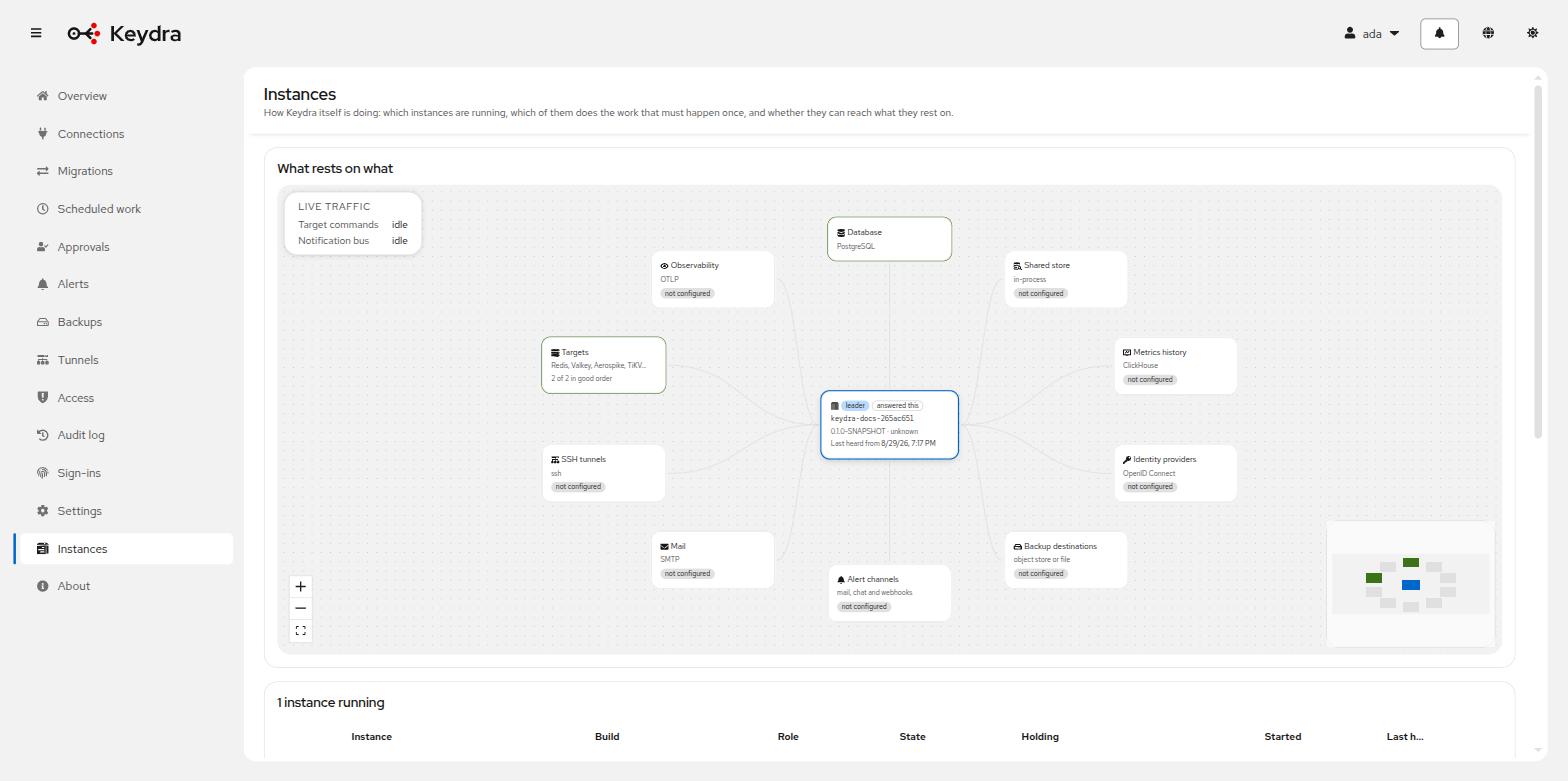
Where more than one Keydra runs, the Instances page says who is here, what each of them is holding, and what they all rest on. It is also where an instance is taken out of service before it is stopped.
-
instance:readto read the page. -
instance:drainto drain one. A separate permission on purpose: reading where the work is and deciding where it goes are not the same act.
-
Open Instances. Each row is one running Keydra, with when it was first heard from and when it last renewed its lease. One of them is marked as holding the chores — the work that must happen once, wherever there are several.
-
Read what each is holding: sockets is how many browsers it is talking to, streams is how many connections it holds open against a target because somebody is watching, and jobs is long work under way. Expand a row to see which targets it holds clients for.
-
To take one out of service, open its actions and choose Drain. The dialog says what that does before it does it.
-
Watch the numbers fall. Sockets go first as browsers reconnect and the balancer sends them elsewhere; streams follow them; jobs stay, because those do not move on their own.
-
At zero, stopping the instance costs nobody anything. Put back into service undoes it.
A draining instance reports itself unready at /q/health/ready, which is what makes a load
balancer stop sending to it, and gives the chores back within a beat. Liveness stays up: draining
is not a way to get a pod killed.
The request arrives wherever the balancer sent it, not at the instance being drained. Two Keydra instances never connect to each other — they meet through the database, and the instance being drained reads the instruction on the beat it already makes. Its own column on the roster rather than folded into the role, because the interesting moment is when an instance is both: still the leader, already draining, about to stop being the first.
A process that has just started is not draining, whatever the row said before it. That is why
there is no configuration property for this: draining=true in a manifest is a thing somebody sets
once and forgets, and what it produces is a fleet that comes up refusing traffic.
Stopping the instance is not done from here. That belongs to whatever started it — and the thing that restarts pods would start it again.
Checking what Keydra reaches#
The lower half of the Instances page lists everything this installation reaches: the database, the stores, the identity providers, the mail relay, the backup destinations, the alert channels, the tunnels and the targets themselves.
Most rows are counts — how many there are and how many are switched on. Two of them carry more than that.
Identity providers and backup destinations are asked whether they answer. The instance holding the chores does it on a slow clock, ten minutes by default, and writes down what came back. The page reads that row rather than causing a request, which is what keeps ten people watching from being ten times the outbound traffic of one, aimed at somebody else’s service.
The detail column says what was found and how long ago:
-
1 of 2 answering · checked 6m ago— one of them stopped answering, and the reading is six minutes old. -
Not checked yet— nothing has asked. The row is not drawn red by that: it has not been asked, which is a different thing from having failed.
Check now asks everything immediately, for the moment somebody has just changed a destination
and does not want to wait for the next round. It is refused if the last answer is seconds old — a
button that can be held down is a way to make Keydra hammer somebody else’s service from a
page that only needs instance:read.
Alert channels and the mail relay are counted and never asked. The reason is not that the check would be hard: fetching a discovery document is a request somebody’s server answers a thousand times an hour, and writing a small file into a bucket and taking it away again is a round trip nobody sees. Posting to a chat channel is a message a person reads, and a status page that pinged an incident channel every ten minutes would be a page nobody is allowed to keep open. Those keep the Check button they already have on their own configuration page.
For a backup destination it is the whole round trip — write a small file, look for it, take it away again — because credentials that can log in and not write are the commonest way a destination is wrong, and a check that only opened a connection would pass for one that cannot be written to. For an identity provider it is a fetch of the issuer’s discovery document, which is the same request a sign-in makes first. Something switched off is not asked at all.