Pub/Sub
Subscribe to channels and patterns and publish to them. The subscription belongs to the server, so every tab sees the same messages.
How subscriptions work here#
A subscription belongs to the server, not to your browser tab. Keydra subscribes once and fans the messages out over the notification hub, so every tab — and every colleague — sees the same messages, and closing a tab does not end the subscription.
That is also why subscribing is not something the console does: SUBSCRIBE never returns,
and the console’s connection is shared.
Channels and patterns are both supported. A pattern subscription uses PSUBSCRIBE, so
news.* follows every channel under news.
Subscribing to a channel and publishing to one#
-
pubsub:subscribeto listen,pubsub:publishto send.
To listen:
-
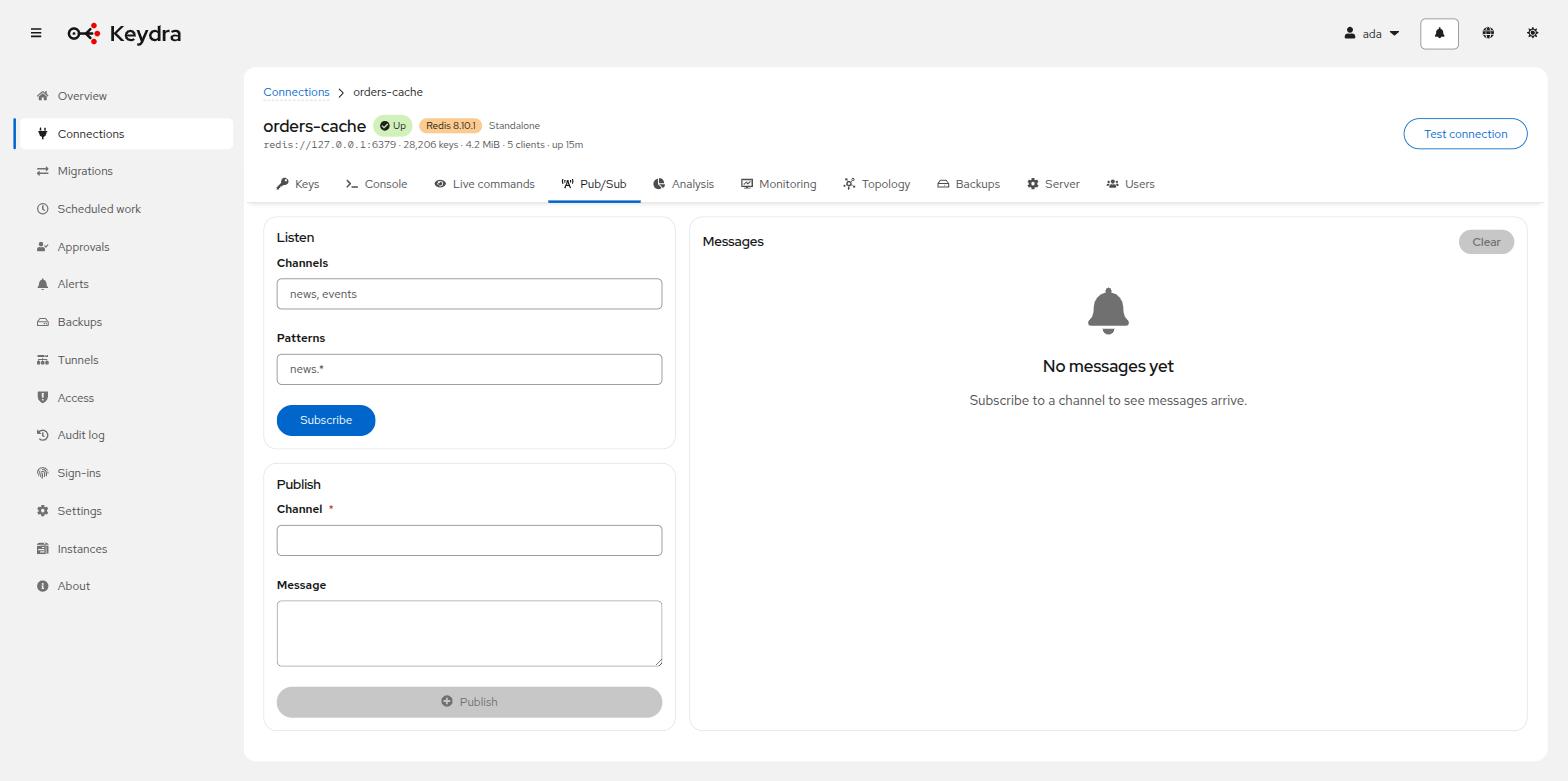
Open the target and go to Pub/Sub.
-
Enter one or more Channels — the placeholder shows the shape,
news, events— or Patterns, such asnews.*. -
Click Subscribe. If a subscription is already open, the button reads Replace subscription.
-
Stop listening ends it, for everybody.
To publish:
-
Complete Channel and Message.
-
Click Publish.
Messages appear under Messages with the time they were Received. While a subscription is open and nothing has arrived, the panel says so rather than looking broken: The subscription is open; anything published to it appears here.