Alerts
A rule watches one reading of one target and says so when it crosses a line — against a number, or against what the same hour read last week.
What a rule is#
A rule is a target, a metric, above-or-below, a number, and how long it has to hold.
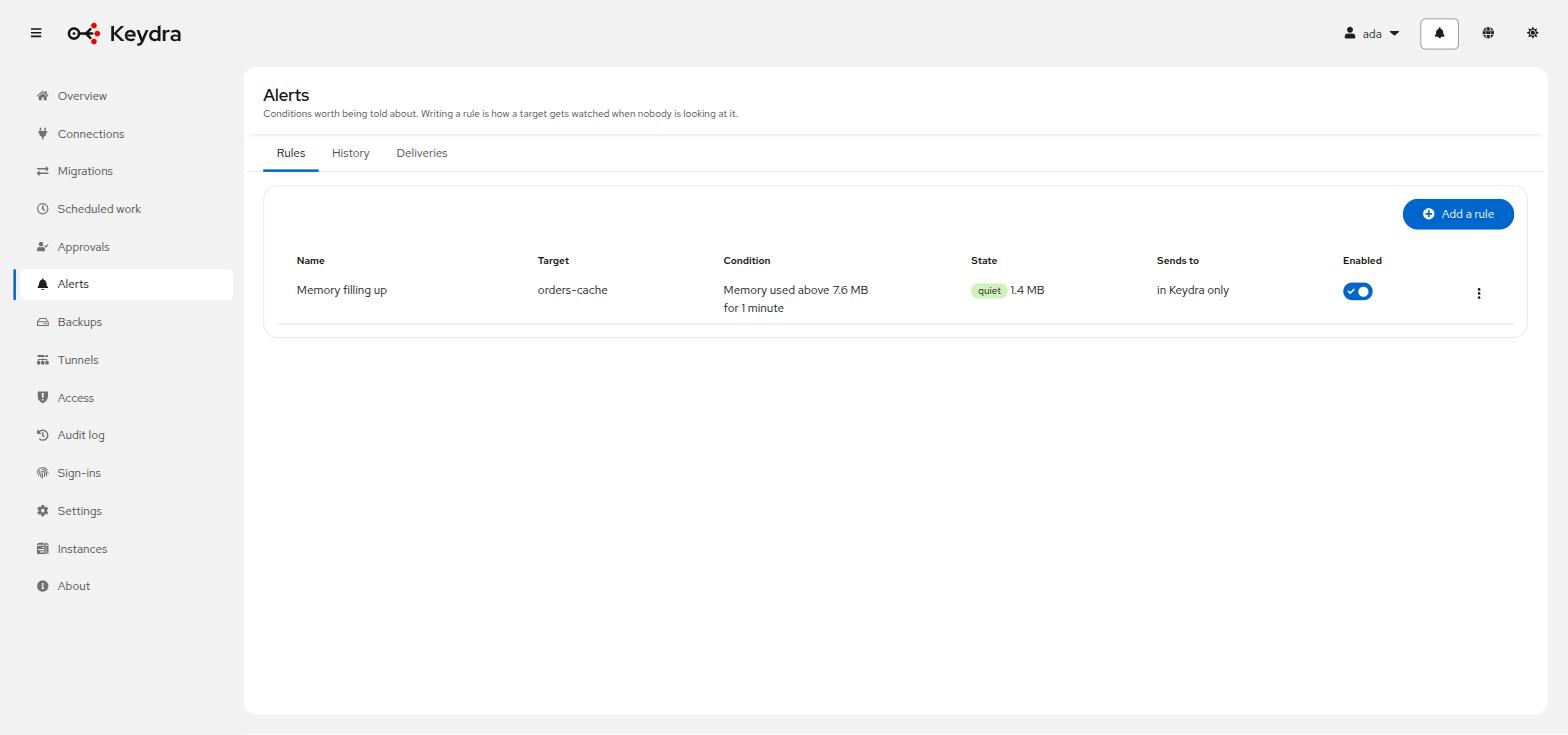
The duration is the part that makes it usable. Without it, every scrape spike is an alert — and an alert that has cried wolf twice gets muted, which is worse than not having one. The options are the first reading, 1 minute, 5 minutes, 15 minutes and 1 hour.
A rule is evaluated when a reading arrives, not on a clock of its own. So writing one is also a reason to watch: an enabled rule keeps its target sampled whether or not anybody has a dashboard open.
Three states, and only the transitions are events#
A rule moves quiet → pending → firing, and back. Only the transitions are recorded and sent. A rule that has been firing since Tuesday appears once in the history, and clearing appears too.
What can be watched#
| Name | Description |
|---|---|
|
How much memory the server reports using. |
|
Memory used as a percentage of the configured limit. Meaningless on a server with no limit, which is what makes the byte figure worth having as well. |
|
How many clients the server currently has. |
|
Commands per second, as the server reports it. |
|
The proportion of key lookups that found something. A cache whose hit ratio falls is a cache that has stopped paying for itself. |
|
How many keys the database holds. |
|
Keys the server discarded because it was at its memory limit. A rate, so it cannot be compared with a historical baseline. |
|
Keys removed because their TTL ran out. Also a rate. |
|
How long the server has been up. Below a threshold means it restarted. |
|
The target has stopped replying. A yes-or-no condition rather than a number, and the one most worth being told about — a server that answers nothing reports no other metric to compare. |
Not answering deserves its own mention. A target that has stopped replying reports no memory figure to compare against a threshold, and it is the thing most worth being told about — so the absence of a reading is a condition rather than a gap in the data.
Comparing with the past instead of with a number#
A threshold can be a percentage of what the metric read over an earlier window — the hour before, the same hour yesterday, the same hour last week. A hundred and forty means forty per cent above it; sixty means forty per cent below.
This is what most people actually mean. "Busier than usual" moves with the service, where a fixed number is wrong twice: too low on the day traffic doubles for a good reason, too high on the night something is quietly leaking.
Not every metric can have one, and the ones that cannot are refused while the rule is being written rather than silently never firing:
-
A rate measured between two readings has no meaning in a single aggregated bucket.
-
A yes-or-no condition has nothing to be a percentage of.
-
A window the readings store cannot answer — memory holds about an hour, so comparing with last week needs the readings store.
A rule whose baseline cannot be read now is left exactly as it is: not fired, not cleared. Absence is not a value.
Writing an alert rule#
-
You hold
alert:manageon the target.
-
Go to Alerts.
-
Click Add a rule.
-
Choose the target and the Metric.
-
Choose Above or below and give the threshold.
-
Choose Has to hold for.
-
Leave Enabled ticked. The hint says what that means: an enabled rule keeps its target sampled, whether or not anybody has the dashboard open.
-
Optionally choose a Delivery. Without one the rule reads in Keydra only — the event is still recorded and shown here either way.
-
Save.
The rule appears with its condition written out as a sentence and what it currently reads. When it fires, a notification arrives wherever you are in Keydra, and History records the transition.
Deleting a rule removes it and everything it has said. Nothing on the target changes.
Sending alerts somewhere#
A delivery is a second copy. The event is in the history and on the notification hub either way; a delivery is for the hours when nobody has Keydra open.
-
You hold
alert-delivery:manage. This is an administrator’s: a delivery holds a credential to somewhere outside, and choosing where a server’s troubles are announced is not part of watching that server.
-
Go to Alerts and open Deliveries.
-
Click Add a delivery.
-
Choose the Kind:
Name |
Description |
|
An HTTP endpoint. A JSON body naming the rule, the target and the reading — which is how Slack, Teams, Discord and most on-call tools take a message. |
|
Mail, through a server you nominate. The subject names the target and what happened, because a subject line is what somebody sees first. |
|
A Telegram bot token and a chat id, so the message arrives in the group people are already in. |
|
A Slack bot token and a channel by name. Beside the webhook kind rather than instead of it: naming the channel means it can be changed without issuing a new address. |
|
The WhatsApp Cloud API. Needs a numbered identity to send from as well as one to send to, which is the one field the other chat kinds do not have. |
+ . Complete what that kind asks for. A delivery missing the one field its kind needs is refused on the form — the worst moment to discover that a token was never saved is the moment the message that would have said something is the message that is lost. . Save.
The delivery appears in the list. A rule pointing at it shows sending, then sent — or not delivered, with the reason recorded on the event.
A failure to deliver never loses the alert. It is already in the history and already on the notification hub.
Tokens are credentials and are treated as such: encrypted at rest, never returned by the API, and kept rather than cleared when an edit form arrives with the field empty. The recipient is not a credential — a channel name is a channel name — so a list can say where alerts go without decrypting anything.
Pick every destination the rule should announce itself in. The alternative — writing the rule twice, once per destination — works on the day it is done and drifts from the day after: somebody raises the threshold on one copy, or disables one while investigating, and the same condition now alerts two channels differently.
What the event records is the worst of what happened. Two of three delivered means somebody’s channel did not hear, and an event that said sent would be reassuring exactly the person who needs to know it did not arrive; the detail then names which one failed and what it said.
A destination that fails does not stop the others, which is the whole point of naming more than one.
An identity provider or a backup destination that stops answering announces itself to whichever of these destinations is chosen under Keydra’s own troubles, at the bottom of this page.
It is not a rule and there is nothing to configure about when: a destination is reachable or it is not, so there is no threshold to pick and no window to average over. What varies is only where the news goes, and it goes to the same destinations the rules use so that a token is rotated in one place.
Once on the way down and once on the way back. Something that has been unreachable since Tuesday is one message on Tuesday rather than one every ten minutes for a week, and it is answering again is the message that closes the one before it.
Choosing nothing is a real answer and the default: the instances page says what answered and how long ago that was found out, either way.